2023-03-28 · 8 min read · 개발
Gatsby - 카테고리 구현하기
카테고리 구현하기
Gatsby에서 카테고리를 구현하는 방법으로 여러 개 존재할 것입니다. 그중에서 저는 Gatsby 홈페이지에서 제안하는 Creating Tags Pages for Blog Posts 방식으로 구현했습니다. 해당 글에서는 태그를 예시로 진행되지만 카테고리에서도 적용이 가능합니다.😄
Frontmatter에 category 추가하기
category에 대한 데이터를 받아오기 위해서는 해당하는 컨텐츠 (mdx, md, …) 파일에서 frontmatter 영역에 카테고리를 추가하면 됩니다.
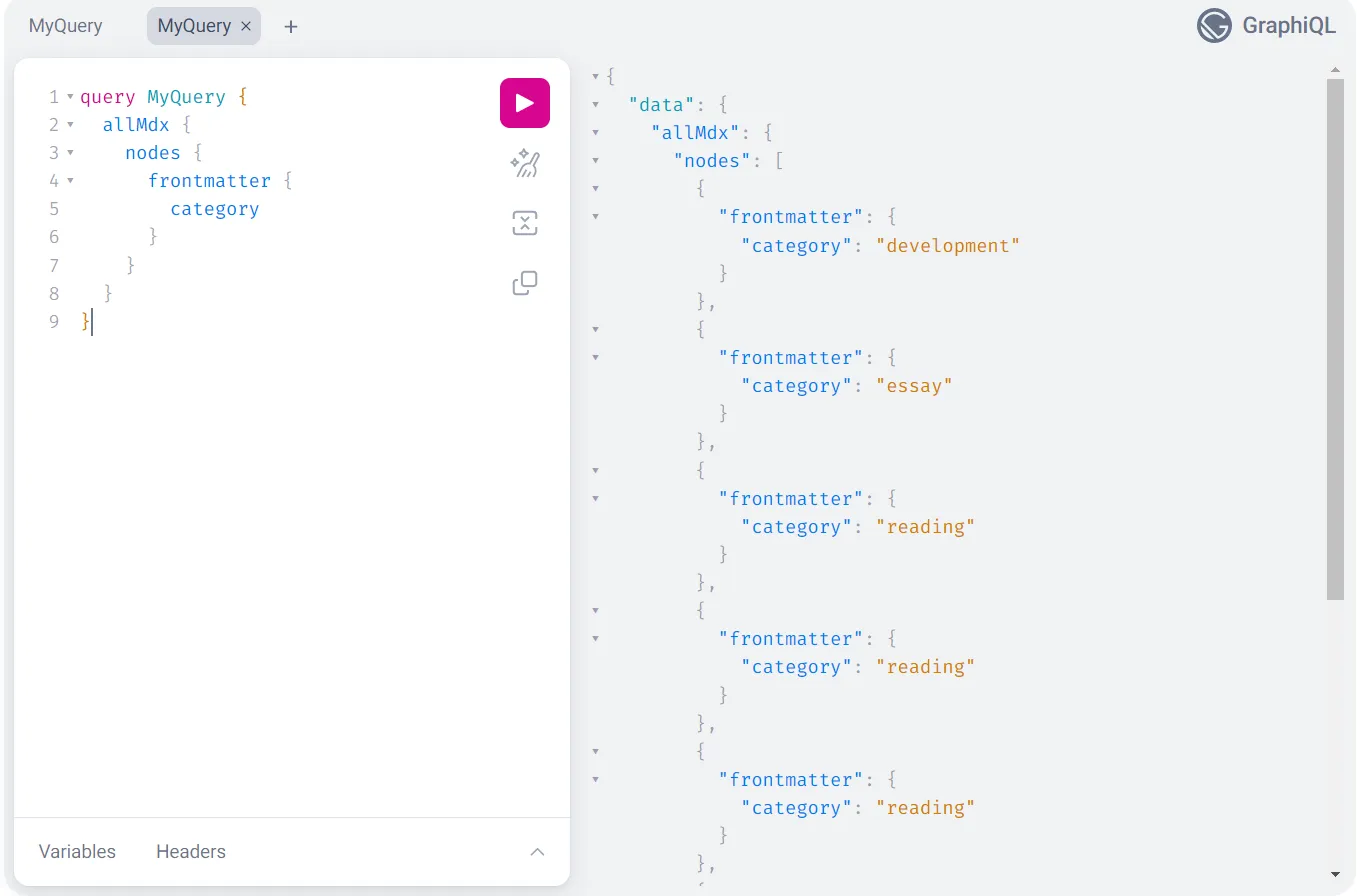
---title: 'Gatsby - 카테고리 구현하기'category: 'development'---그러면 Graphql에서 category에 대한 데이터가 생성되는 것을 확인하실 수 있습니다.
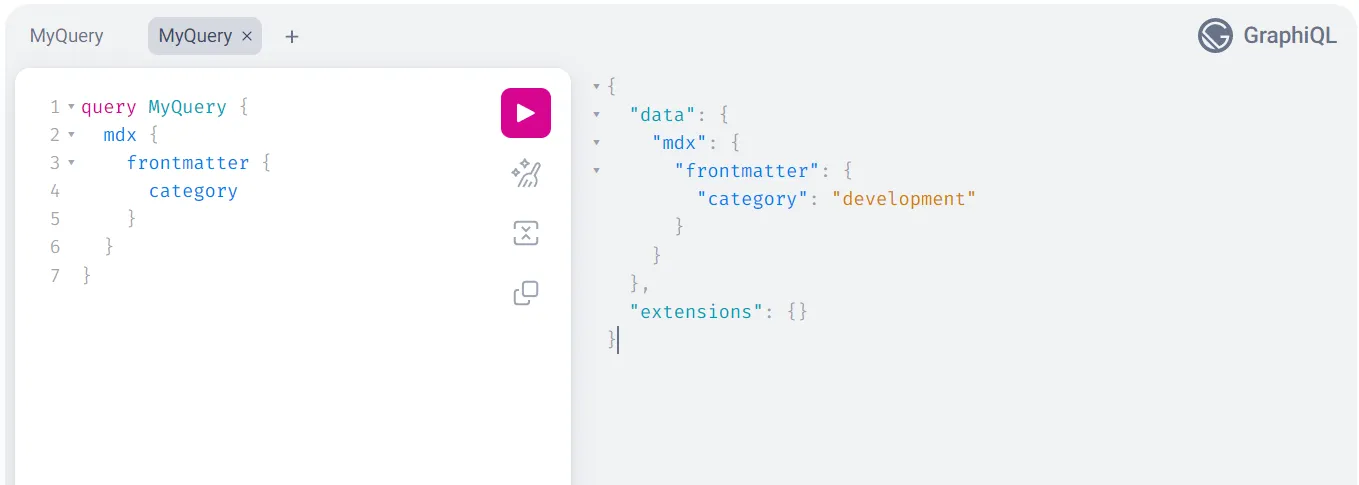
특정 mdx 파일뿐만 아니라 전체 mdx 파일에서도 해당하는 카테고리에 대한 데이터를 받아올 수 있습니다.
카테고리 페이지 Template 만들기
만들어진 category 데이터를 받을 Template 파일이 필요합니다. 이는 다음 단계의 gatsby-node.js의 createPages에서 사용될 것입니다.
src/templates/CategoryTemplate.tsx 경로에 파일을 만들어줍니다. 다른 페이지들을 만들었던 것처럼 코드를 구성해주시면 됩니다.
이렇게 만들어진 Template은 /category/{category-name}와 같은 경로로 활용될 것입니다.
import App from 'App'import { Author, PostList, Seo } from 'components'import Flex from 'components/@shared/Flex'import Category from 'components/Category'import Layout from 'components/Layout'import Post from 'components/Post'import { graphql, HeadFC, PageProps } from 'gatsby'import useIntersectionObserver from 'hooks/useIntersectionObserver'import React from 'react'import { Content } from 'types/content'
interface Props {  allMdx: {    nodes: Content[]  }  category: {    totalCount: number    group: {      totalCount: number      fieldValue: string    }[]  }}
const CategoryTemplate = ({  data,  pageContext,}: PageProps<Props, { category: string }>) => {  const { ref, page } = useIntersectionObserver(data.allMdx.nodes.length)
  return (    <App>      <Layout>        <Flex flexDirection="column" gap={20}>          <Author />          <Category selectedCategory={pageContext.category} />
          <PostList            render={data.allMdx.nodes.slice(0, page).map((node) => (              <Post key={node.id} node={node} />            ))}          />          <div ref={ref} />        </Flex>      </Layout>    </App>  )}
export default CategoryTemplate
export const Head: HeadFC = () => <Seo />
export const query = graphql`  query ($category: String) {    site {      siteMetadata {        title      }    }    allMdx(      sort: { frontmatter: { date: DESC } }      filter: { frontmatter: { category: { in: [$category] } } }    ) {      nodes {        frontmatter {          date(formatString: "MMMM DD, YYYY")          title          slug          category        }        id        excerpt      }    }  }`
템플릿 페이지를 렌더링하기 위해 gatsby-node.js 수정하기
Template에 해당하는 페이지를 만들기 위해 gatsby-node.js에서 createPages 작업이 이루어집니다.
전체 코드는 다음과 같습니다.
const path = require('path')
exports.createPages = async ({ actions, graphql, reporter }) => {  const { createPage } = actions  const categoryTemplate = path.resolve('src/templates/CategoryTemplate.tsx')  const result = await graphql(`    {      allMdx {        group(field: { frontmatter: { category: SELECT } }) {          fieldValue        }      }    }  `)
  if (result.errors) {    reporter.panicOnBuild(`Error while running GraphQL query.`)    return  }
  const categories = result.data.allMdx.group
  categories.forEach((category) => {    createPage({      path: `/category/${category.fieldValue}`,      component: categoryTemplate,      context: {        category: category.fieldValue,      },    })  })}
앞서 만들었던 Template 파일을 categoryTemplate변수로 받습니다.
result 에서는 category에 대한 값들을 받습니다.
const { createPage } = actionsconst categoryTemplate = path.resolve('src/templates/CategoryTemplate.tsx')const result = await graphql(` { allMdx { group(field: { frontmatter: { category: SELECT } }) { fieldValue } } }`)이렇게 만들어진 category 데이터는 반복문과 createPage를 통해 페이지를 생성하게 됩니다.
context 에서 사용되는 값은 CategoryPage query에서 지정된 category 게시물 데이터를 가져오는데 사용됩니다.
const categories = result.data.allMdx.group
categories.forEach((category) => {  createPage({    path: `/category/${category.fieldValue}`,    component: categoryTemplate,    context: {      category: category.fieldValue,    },  })})
추가로 /category 경로에 대한 페이지가 필요하면 /src/pages/category.js에서 작업하시면 됩니다.
카테고리에 게시판 개수 구현하기
훌륭한 GraphQL
단순히 카테고리만 구분하기에는 아쉬움이 많기 때문에 카테고리 옆에 해당하는 게시판 개수를 보여주면 좋을 것 같습니다.
이 또한, GraphQL를 통해 카테고리별로 해당하는 게시물 개수의 데이터를 받아올 수 있습니다.
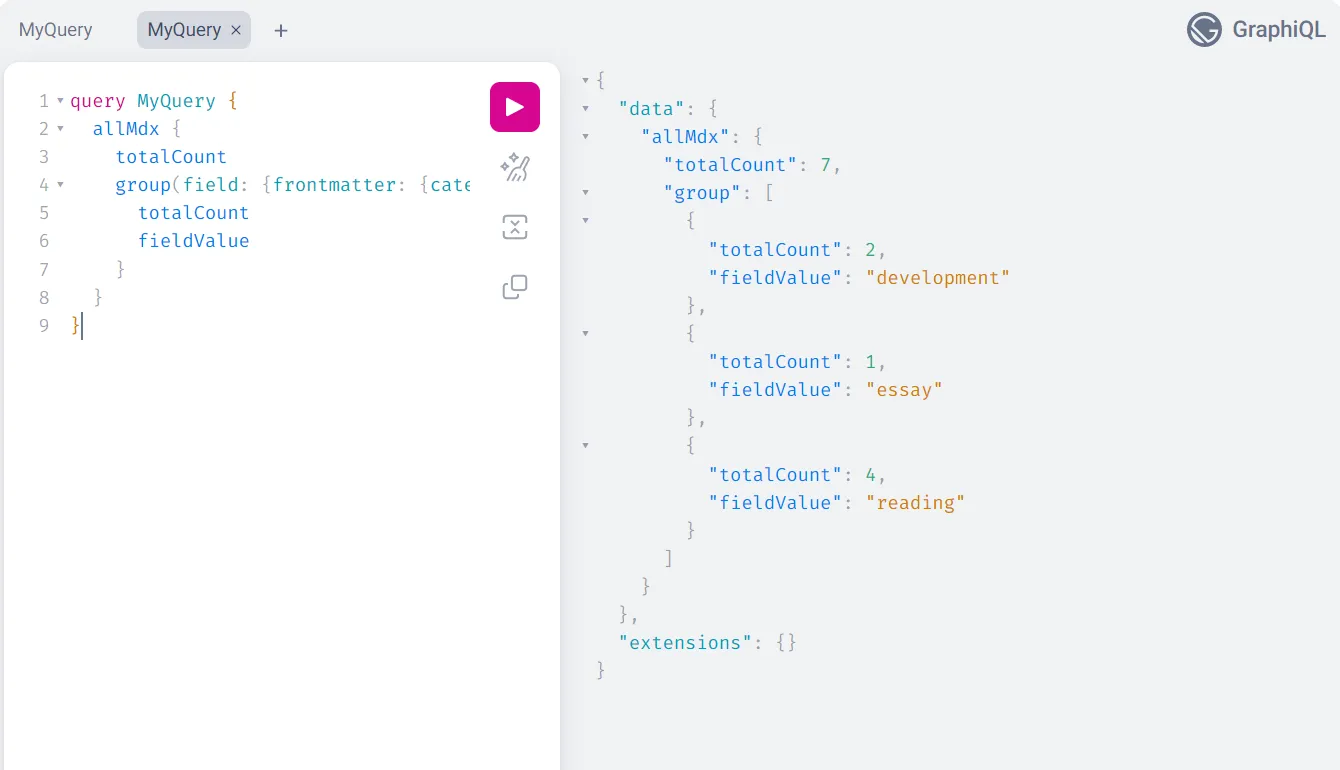
게시물 개수를 받아올 수 있으니 query에서 해당 데이터를 받아오면 됩니다.
하지만 페이지에서 카테고리에 대한 데이터를 받아오는 방식은 비효율적입니다. 페이지를 추가할 때마다 카테고리 데이터를 추가하는 번거로운 과정을 거쳐야 할 것입니다.
그래서 Category 컴포넌트에서 데이터를 불러오는 방식이 더 좋을 것입니다. 카테고리에 대한 관심사를 Category 컴포넌트 내부에서만 관리할 수 있기 때문에 용이합니다.
이와 관련해서 Graphql에서 지원해주는 기능이 있었습니다.
useStaticQuery를 사용하면 페이지 단위가 아닌 Category 컴포넌트에서도 데이터 처리가 가능합니다.
import styled from '@emotion/styled'import { PATH } from 'constants/path'import { graphql, Link, useStaticQuery } from 'gatsby'import React from 'react'
interface Props {  selectedCategory: string}
interface CategoryPostCount {  allMdx: {    totalCount: number    group: {      totalCount: number      fieldValue: string    }[]  }}
const Category = ({ selectedCategory }: Props) => {  const data: CategoryPostCount = useStaticQuery(graphql`    query {      allMdx {        totalCount        group(field: { frontmatter: { category: SELECT } }) {          totalCount          fieldValue        }      }    }  `)
  return (    <List>      <Item to={`${PATH.HOME}`} isactive={+(selectedCategory === 'all')}>        All ({data.allMdx.totalCount})      </Item>
      {data.allMdx.group.map((category) => (        <Item          key={category.fieldValue}          to={`${PATH.CATEGORY}${category.fieldValue}`}          isactive={+(selectedCategory === category.fieldValue)}        >          {category.fieldValue} ({category.totalCount})        </Item>      ))}    </List>  )}
export default Category
const List = styled.nav`  display: flex;  justify-content: space-around;  flex-wrap: wrap;  gap: 10px;  width: 100%;  height: 100%;  padding: 20px;  border-bottom: 1px solid ${({ theme }) => theme.colors.secondary.base};`
const Item = styled(Link)<{ isactive: number }>`  height: 100%;  text-align: center;  transition: 0.3s;  color: ${({ theme, isactive }) => isactive && theme.colors.secondary.dark};  &:hover {    color: ${({ theme }) => theme.colors.secondary.dark};  }`
마무리
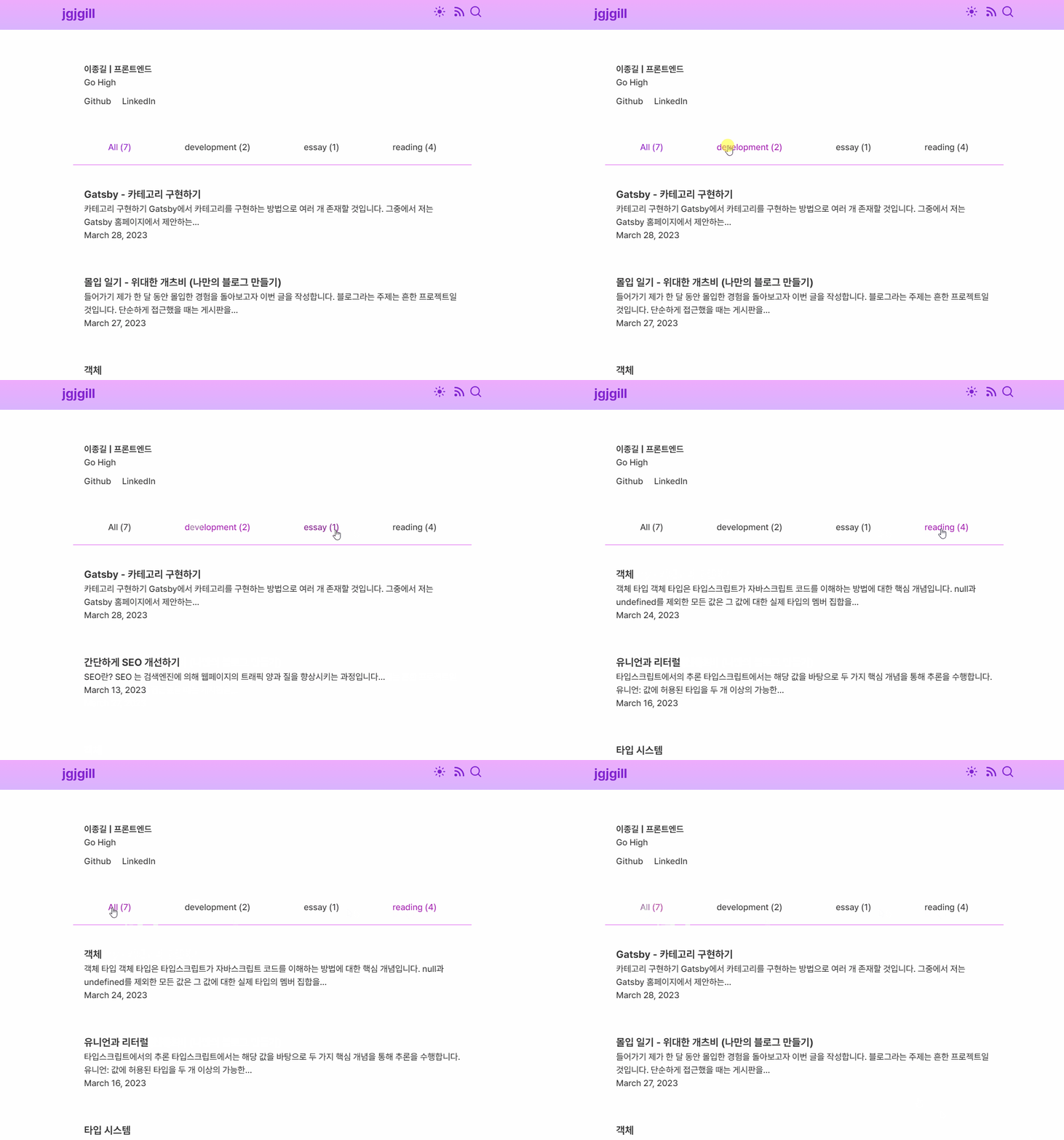
이렇게 Gastby에서 카테고리를 구현한 과정에 대해 알아봤습니다.
이번 글을 통해 Gatsby에서 카테고리를 구현하려는 분들에게 도움이 되었으면 합니다.🙇♂️